
AAA Core System
The AAA Core System is the foundation of AAA Trading Systems for NinjaTrader 8, bringing market analysis, signal qualification, centralized trade controls, ATM-based execution, and risk management together in one coordinated trading environment.
The core configuration is designed to give the trader a centralized way to monitor market conditions, control which signals and filters are active, select trade direction and ATM settings, and determine when manual, semi-automated, or automated execution is permitted.
The AAA Core System represents the base system configuration. Additional indicators, custom modules, advanced filters, and other features may be offered separately depending on the selected package.
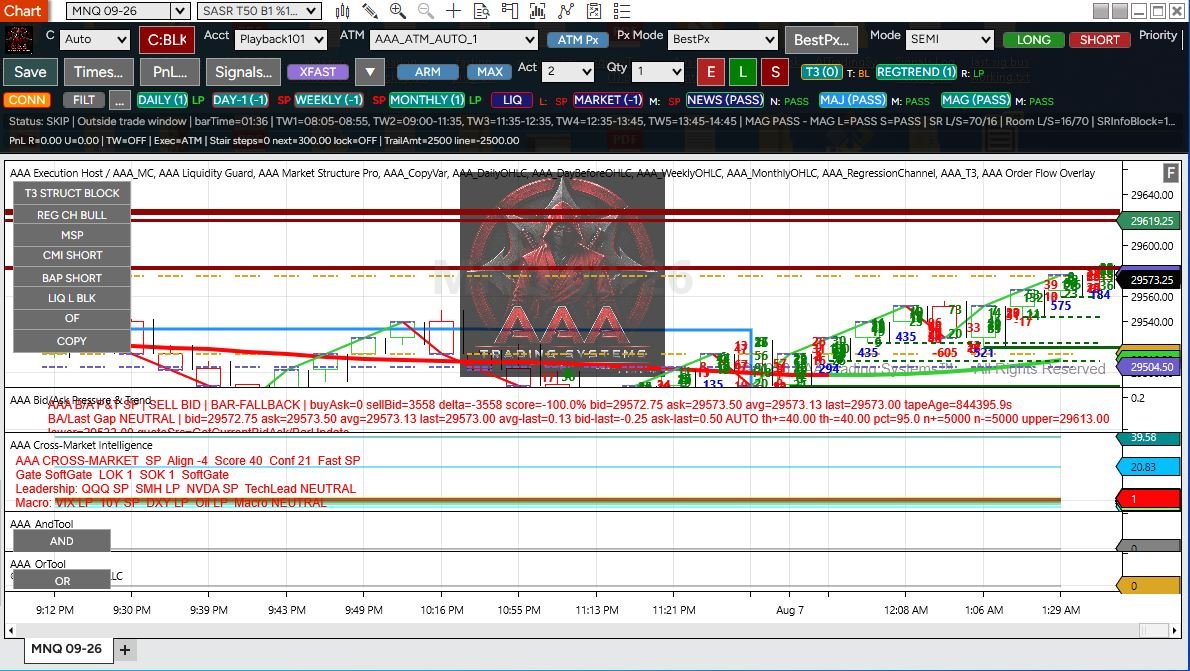
What the AAA Core System Controls
The AAA Core System brings the primary trading permissions, signal controls, execution settings, and risk-management functions into one centralized workflow so the trader can define how the system is allowed to operate.
Automation Mode
Choose how the system is allowed to operate, including manual, semi-automated, or automated modes, while keeping control over when automation is enabled.
Trade Direction & ATM
Control whether long trades, short trades, or both are permitted, while selecting the active NinjaTrader ATM configuration and related execution settings.
Filters, Signals & Core Logic Tools
Filters: Opens the Filters window, where the trader defines the custom filters AAA will use when qualifying trade conditions. Signals: Opens the Signals window, where the FastSignal names used by the Core System are specified. T3 and REGTREND: These are separate directional gates on the Master Controller. When enabled, each gate must agree with the proposed trade direction before an automatic entry is permitted. Additional filters, indicators, and logic modules can be incorporated when they are included in the selected AAA configuration.
Position & Quantity Control
Set position quantity and active-trade limits, and apply the position controls available in the selected AAA configuration to help govern trade size and system activity.
Timing & Trading Windows
Define when the system is permitted to trade by using configured time windows, session controls, and other timing-based restrictions available in the selected AAA configuration.
Risk & PnL Controls
Apply configured profit and loss protections, trade limits, and other risk-management controls designed to restrict system behavior according to the trader’s selected settings.
Choose How AAA Operates
AAA can be configured to support different levels of trader control, from fully manual decision-making to semi-automated operation and automated execution when the selected conditions and permissions are met.
Manual Control
Use AAA’s indicators, market-state tools, signal information, and chart-based controls to evaluate conditions while keeping trade entry and management decisions under direct trader control.
Semi-Automated
Use the AAA Master Controller to enable or disable signals, filters, trade direction, ATM selection, quantity, and other execution settings while keeping direct control over when automation is active.
Automated Execution
When the configured signals, filters, permissions, and trade conditions are satisfied, AAA can submit trades through the selected NinjaTrader ATM configuration using the active execution settings.
AAA Master Controller
The AAA Master Controller is the central control interface for the AAA Core System, giving the trader direct access to automation mode, ATM selection, trade direction, quantity, signal permissions, market filters, execution settings, and system status from the chart.

Master Controller Quick-Start & Control Guide
Automation & Trade Permissions
Mode — OFF / SEMI / AUTO: OFF blocks automatic signal entries. SEMI allows one qualified entry per direction; after a long or short entry is used, additional signals in that same direction are blocked until the SEMI state is reset. AUTO continues accepting qualified entry signals as long as the enabled permissions, filters, timing rules, and risk controls allow the trade. LONG / SHORT: These buttons independently permit or block automatic long and short entries. ARM: This is the master enable for the automated trading logic; when ARM is off, automatic entries are blocked.
ATM & Entry Controls
ATM: Selects the NinjaTrader ATM template that will manage the trade after entry. ATM Px: Turns AAA custom entry-pricing logic on or off; when it is off, ATM entries are submitted as market orders. Px Mode: Market submits immediately at market. Passive uses a limit order on the less-aggressive side of the spread. Aggressive uses a limit price on the more-aggressive side to improve fill probability. Limit→Mkt first submits a passive limit order and, if it remains unfilled for the configured timeout, cancels it and converts the entry to market. Previous Low, Open, High, Close and Current Open/Close use those selected bar prices as the limit-entry reference. BestPx evaluates the permitted live Bid, Ask, Last and, when enabled, current-bar OHLC candidates; for longs it selects the lowest valid entry price, while for shorts it selects the highest valid entry price. BestPx can also reject bar/Last candidates that are too far from the live market using the Max Away setting.
Core Configuration Windows
Filters: Opens the Filters window, where the trader defines the custom filters AAA will use when qualifying trade conditions. The AAA Core System includes AAA Copy, AAA AND, and AAA OR, which can be used with available variables to create custom filter logic and combine multiple conditions into the pass/block rules used by the system. Signals: Opens the Signals window, where the fast-signal names used by the Core System are specified so the Master Controller knows which configured signals can act as entry triggers. T3 and REGTREND: These are separate directional gates on the Master Controller. When enabled, each gate must agree with the proposed trade direction before an automatic entry is permitted. Additional filters, indicators, and logic modules can be incorporated when they are included in the selected AAA configuration.
Quantity, Limits & Status
MAX: Sets the maximum number of trades AAA is permitted to take per direction under the configured trade-limit logic. Act: Controls the maximum-active-contracts limit; when enabled, AAA blocks additional entries that would exceed the selected active-contract limit. Qty: Sets the number of contracts used for each new entry order. These controls work together so the trader can separately define how many entries may occur, how much total position activity is permitted, and how large each individual entry will be. Status information: The Master Controller also receives live execution information from the AAA host, including system status, realized and unrealized PnL, time-window state, and recent signal information used to show what the system is currently doing or why an entry may be blocked.
Manual Controls & Setup Windows
E — Manual Exit: Sends a manual close request that closes the active tracked ATM trade and any remaining same-instrument position without disabling the AAA strategy. L — Manual Long: Submits a discretionary long entry using the currently selected account, ATM template, and ATM Px settings. S — Manual Short: Does the same for a short entry. Manual L/S entries do not require AUTO or SEMI mode, ARM, fast-signal approval, or the normal regime/filter approval, allowing the trader to enter manually while still using AAA’s execution path. Manual entries can still be prevented by applicable safety conditions such as an active loss cooldown or missing account/ATM execution information.
Save, Times & PnL Setup
Save: Stores the current Master Controller configuration so the selected operating settings can be restored rather than re-entered each time. Times: Opens the trading-window setup, where the trader defines the times during which AAA is permitted to take automated entries. Outside the enabled trading windows, new automatic entries are blocked. PnL: Opens the profit-and-loss/risk setup used to configure account-level protections such as daily profit and loss limits, trailing drawdown controls, and related lockout or cooldown behavior available in the Core configuration.
Included Core Logic Tools — AAA Copy, AAA AND & AAA OR
AAA Copy: Lets the trader take a selected NinjaTrader input or indicator plot and publish its current value into the AAA system under a custom variable name. That variable can then be used by other AAA logic tools. AAA Copy can also optionally create named long and short FastSignals when the copied value meets user-defined greater-than, less-than, or equal-to conditions.
AAA AND: Combines multiple conditions into custom long and short logic where all required conditions must be true before the condition passes. It can use variables created by AAA Copy as well as supported built-in market values, and it can publish its result as another variable or as a named FastSignal.
AAA OR: Works similarly, but allows the condition to pass when any one of the configured OR conditions is true. AAA AND and AAA OR also support separate cancel/block conditions and can be chained with other AAA variables to build more complex custom logic.
Together, these three tools allow the Core System to turn indicator values into reusable variables, combine those variables into custom trading conditions, and create named signals that can be incorporated into the AAA workflow.
Filters Window — Entry Qualification Rules
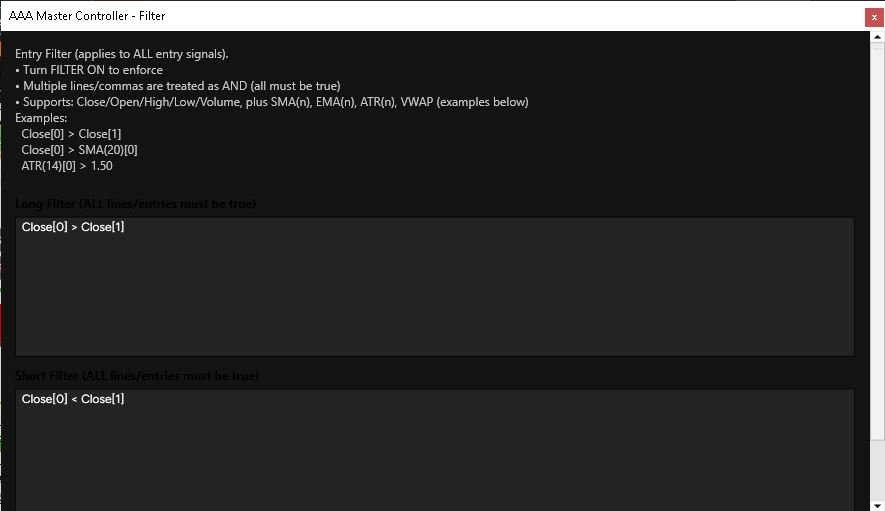
The Filters window controls entry-qualification rules that apply to all automatic entry signals when FILTER is enabled. Separate Long Filter and Short Filter rules can be created, and multiple conditions are treated as AND requirements—meaning every listed condition for that direction must pass before the filter allows the entry. The window supports direct market expressions such as Open, Close, High, Low, Volume, SMA, EMA, ATR, and VWAP. For more customized logic, the included AAA Copy, AAA AND, and AAA OR tools can be used to expose indicator values as named variables, combine multiple conditions, and build reusable logic that can be incorporated into the AAA system’s entry-qualification workflow.
Signals Window — Entry & Exit FastSignal Names
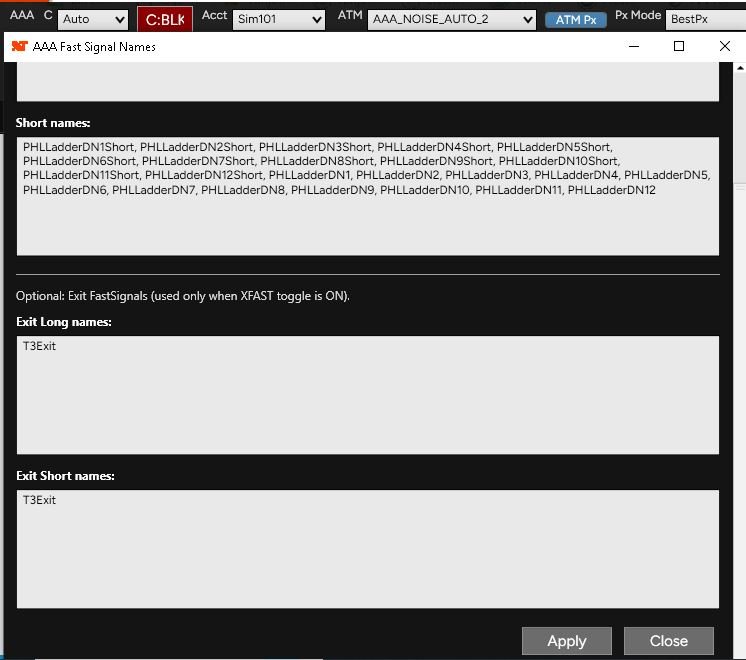
The Signals window defines the named FastSignals that the AAA Core System listens for. Long entry names are listed separately from short entry names, allowing the trader to specify which configured signals can trigger long or short entry requests. The window also includes optional Exit Long and Exit Short FastSignal names. Those exit names are only used when the XFAST toggle on the Master Controller is turned ON, allowing designated FastSignals to act as fast-exit triggers for open trades.
Trading Times Window — Automated Entry Schedule
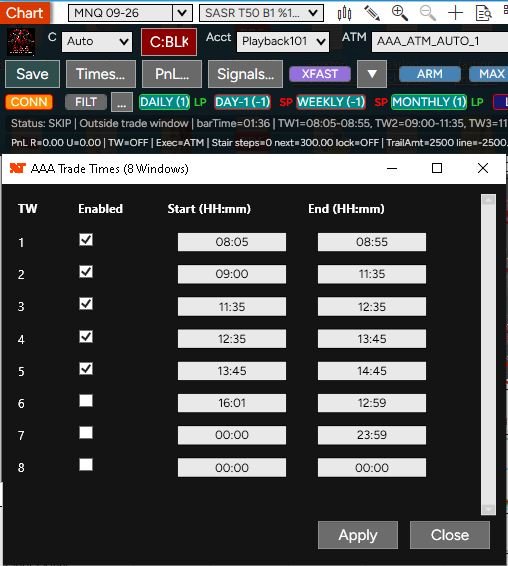
The Trading Times window provides up to eight separate automated-entry windows. Each window can be individually enabled and assigned a Start and End time in HH:mm format. AAA uses the enabled windows to determine when new automatic entries are permitted; when the current time is outside all enabled trading windows, automatic entries are blocked. This allows the trader to create one continuous session or several separate trading periods during the day while leaving other times disabled.
PnL Controls — Account-Level Risk Management
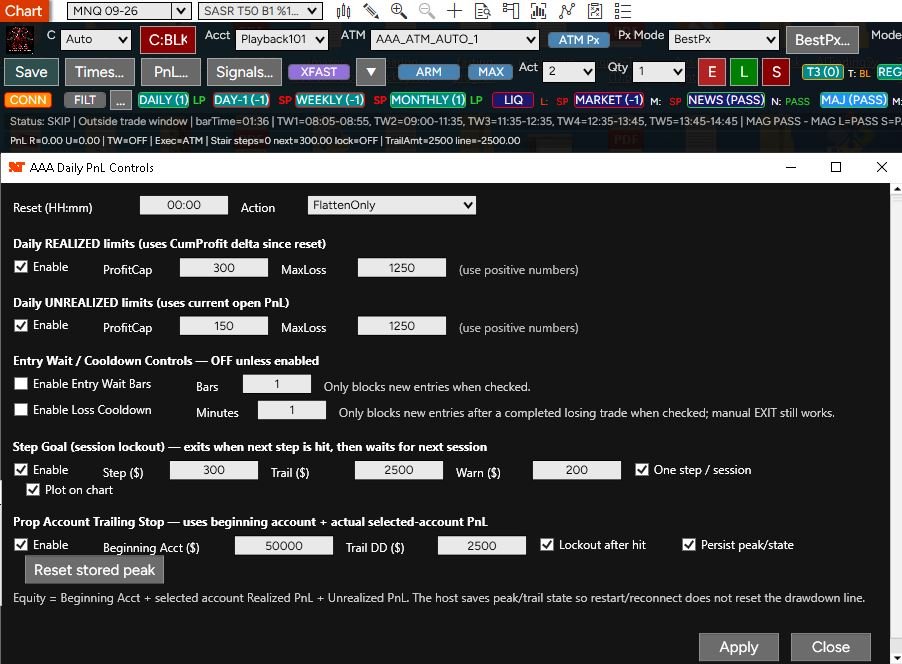
The PnL Controls window provides account-level safeguards for the AAA Core System. Daily Realized limits can enforce a configured profit cap and maximum loss based on cumulative realized PnL since the selected reset time, while Daily Unrealized limits monitor the current open PnL. The Action setting determines the configured response when a limit is reached; the example shown uses FlattenOnly. Loss Cooldown can block AUTO entries and manual L/S entries for a specified number of minutes after a losing trade while still allowing the manual Exit control to function. Step Goal provides a session-based profit-step and trailing-protection system with optional warning and chart display settings. Prop Account Trailing Stop tracks account equity using the configured beginning account value together with realized and unrealized PnL, and can lock trading after the trailing drawdown level is reached. Its peak/trailing state can also be persisted so restarting or reconnecting does not automatically reset the drawdown reference.
Values shown in the screenshot are example configuration values and are not recommended trading or risk settings.
XFAST — Optional Fast Exit Control
XFAST: This toggle enables or disables the Core System’s optional FastSignal-based exit path. When XFAST is ON, AAA monitors the Exit Long and Exit Short FastSignal names configured in the Signals window. If a matching exit signal is received for the direction of the open trade, AAA can use that signal as a fast-exit request. When XFAST is OFF, those configured exit FastSignal names are ignored. This allows the trader to enable or disable FastSignal-driven exits without changing the entry-signal configuration.
What’s Included with the AAA Core System
The AAA Core System includes the Master Controller, AAA Execution Host, core market-analysis indicators, signal and filter tools, and custom logic utilities needed to operate the base AAA configuration. The AAA Execution Host must be enabled on the chart so the Master Controller can process signals, permissions, ATM-based execution, manual commands, and risk controls.
Control & Execution
AAA Master Controller — Central chart-based interface for automation mode, account and ATM selection, entry-price controls, trade direction, signals, filters, quantity, trading windows, PnL protections, and system status.
AAA Execution Host (Required) — The NinjaTrader strategy that runs the Core System’s signal handling, Master Controller communication, ATM-based order execution, manual entry/exit commands, and risk-control logic. It must be enabled for the AAA Core System to operate.
Core Market Analysis
• Daily OHLC — Provides current-session open, high, low, and close reference levels.
• Previous-Day OHLC — Provides prior-session open, high, low, and close reference levels.
• Weekly OHLC — Provides weekly open, high, low, and close reference levels.
• T3 Trend — Provides trend-direction information used by the Core System as a directional trade gate.
• Regression Channel — Provides regression-based trend and directional context for the Core configuration.
• AAA Bid/Ask Pressure & Trend — Analyzes bid and ask activity to provide real-time directional pressure and trend context.
• AAA Predictive Range & Brick Ladder — Provides projected price-range information and predictive high/low reference areas for additional intraday market context.
• AAA Liquidity Guard — Monitors configured liquidity conditions and can provide a blocking condition when price is too close to qualifying liquidity areas.
• AAA Cross-Market Intelligence — Adds broader-market direction and market-condition context from configured external market information.
• Order Flow Overlay — Provides order-flow analysis and market-condition information used by the AAA Core System.
Core Logic Tools
• AAA Copy — Takes a selected NinjaTrader input or indicator plot and publishes its current value into the AAA system under a custom variable name. That value can then be reused by other AAA logic tools. AAA Copy can also optionally create named long and short FastSignals from user-defined numeric conditions.
• AAA AND — Combines multiple variables and market conditions into custom long and short logic where all required conditions must be true before the result passes. It also supports separate cancel conditions, sustain requirements, output variables, and optional FastSignal creation.
• AAA OR — Combines conditions using OR logic, so any configured condition can satisfy the rule unless a cancel condition blocks it. It can also publish reusable output variables and named FastSignals for use elsewhere in the AAA workflow.
Optional Indicators, Modules & Upgrades
The AAA Core System includes the base configuration and tools listed above. Other AAA Trading Systems indicators, custom bars, advanced filters, analysis modules, and future enhancements are not automatically included with the Core package unless specifically identified as part of the selected product package. Additional modules can be added to expand the Core System’s market analysis, signal qualification, automation, and trade-management capabilities.
Getting Started with the AAA Core System
The AAA Core System is designed to operate as a coordinated group of NinjaTrader 8 components. Before allowing automated trading, the included Core indicators and logic tools should be loaded, the required AAA Execution Host should be enabled, and the Master Controller should be configured with the correct account, ATM template, signals, filters, trading times, and PnL/risk settings.
1. Load Core Components
Load the AAA Core System indicators and logic tools onto the NinjaTrader 8 chart or workspace being used for the system. The required Core components provide the market-analysis, directional, signal, filter, and control information used by the Master Controller and execution framework.
2. Enable Execution Host
Enable the required AAA Execution Host on the chart. This NinjaTrader strategy provides the Core System’s execution framework, including Master Controller communication, signal handling, ATM-based order submission, manual entry and exit commands, and the risk-control logic needed for the system to operate.
3. Select Account & ATM
Select the NinjaTrader account and ATM template that AAA will use for new entries. Confirm that the intended account is selected, the ATM template is available, and the quantity and entry-pricing settings match the trader’s intended configuration before enabling automated operation.
4. Configure Signals & Filters
Open the Signals and Filters setup windows and define the entry signals, optional exit FastSignals, and long/short filter rules the Core System should use. Confirm that the configured signal names and filter logic match the indicators and logic tools loaded on the chart before enabling automated entries.
5. Set Trading Times & PnL Controls
Configure the trading windows during which AAA is allowed to take automated entries, then review the PnL and risk settings for the selected account. Set the desired realized and unrealized limits, cooldown behavior, trailing protections, and any other enabled safeguards before allowing the system to trade automatically.
6. Review & Arm the System
Before enabling automated operation, review the selected account, ATM template, quantity, trade direction, signal names, filters, trading windows, and PnL protections. Confirm that the chart and required Core components are operating correctly, then use ARM together with the selected operating mode to permit automated entries only when the configured conditions are satisfied.
System Requirements
AAA Trading Systems software is designed for use with NinjaTrader 8. The AAA Core System requires a properly configured NinjaTrader environment, access to the market data required by the selected indicators, and the account and ATM configuration appropriate for the trader’s intended use. Because AAA may process multiple indicators, signals, filters, market-data inputs, and execution controls simultaneously, a properly maintained trading computer with sufficient processor performance, memory, solid-state storage, and a stable low-latency internet connection is strongly recommended to help reduce platform lag and delayed processing. Specific requirements may vary depending on the AAA indicators, modules, chart configurations, and features being used.
NinjaTrader 8 & Market Data
AAA Trading Systems is designed for NinjaTrader 8 and requires the market data needed by the indicators and features being used. Real-time or historical data availability depends on the trader’s selected data provider, brokerage connection, subscriptions, and instrument access.
Recommended Trading Computer
For best performance, use a modern Windows trading computer with a multi-core processor, sufficient RAM for NinjaTrader and other active applications, and solid-state storage. AAA may process multiple indicators, signals, filters, and market-data inputs simultaneously, so additional processing capacity can help reduce chart lag and delayed system response. Exact hardware needs will vary with the number of charts, indicators, workspaces, and other software running at the same time.
Internet & Platform Stability
A stable, low-latency internet connection is strongly recommended for real-time market data and automated order execution. Network interruptions, delayed data, overloaded workspaces, background applications, or platform instability can affect chart updates, signal processing, and order timing. Traders should keep NinjaTrader and their trading computer properly maintained and avoid unnecessary system load while AAA is operating.
See the AAA Core System in Action
See how the AAA Core System brings the Master Controller, market analysis, signals, filters, ATM-based execution, and risk controls together inside NinjaTrader 8. Our demonstration videos show the system interface, configuration options, and operating workflow so you can better understand how the Core System is designed to function.
Watch DemonstrationsExpand the AAA Core System
Build beyond the Core configuration with additional AAA Trading Systems indicators, custom bars, analysis tools, filters, and specialized modules. Optional products can be added to expand market analysis, signal qualification, trade management, and automation capabilities according to the trader’s needs.
Explore Indicators
Explore additional AAA indicators and analysis tools designed to expand market context, signal qualification, trend analysis, order flow, and other functions beyond the Core System.
Explore IndicatorsExplore Custom Bars
Explore AAA custom bar types designed to provide alternative ways of organizing price movement and market activity inside NinjaTrader 8 for use with compatible AAA analysis and trading tools.
Explore Custom Bars